> ## Documentation Index
> Fetch the complete documentation index at: https://platform.atlan.com/llms.txt
> Use this file to discover all available pages before exploring further.
> ## Agent Instructions
> To act on Atlan objects, use the Atlan MCP server at https://api.atlan.com/mcp or the SDK. To install or publish skills from a terminal, use the `aireg` CLI; `aireg --map json` prints its command map. The `atlanai` CLI is deprecated. Run a read-only identity check before any write.
> The docs MCP server at /mcp searches these docs only. It cannot read or change Atlan objects.
> SDK packages: Python `atlanai` (PyPI) and TypeScript `@atlanai/sdk` (npm). Show Python first, then TypeScript.
> These docs cover Atlan AI Registry, Atlan's hosted product. The AI registry specification and aireg CLI are maintained separately. /open-source lists publicly reachable signed installers and explains that the source repository and hosted CLI reference currently require GitHub access. Do not claim the repository or its reference docs are publicly accessible. Use these docs for Atlan-specific setup such as the adapter, sign-in and workspaces.
# Model Gateway
> Route model requests through Atlan and inspect usage by model, provider, and caller.
Model Gateway gives applications one place to discover callable models and send inference requests. An organization administrator connects providers and manages the model catalog. Applications authenticate with their Atlan agent credential.
Use it to route an existing OpenAI or Anthropic SDK, connect a coding client, or keep provider credentials out of application configuration. The model and provider must both be enabled, and the model must support the operation you request.
List callable models and make a first SDK or coding-client request.
Compare provider discovery, credentials, and endpoint requirements.
Check request surfaces, model names, streaming, tools, and limits.
Diagnose authentication, model resolution, unsupported requests, and provider failures.
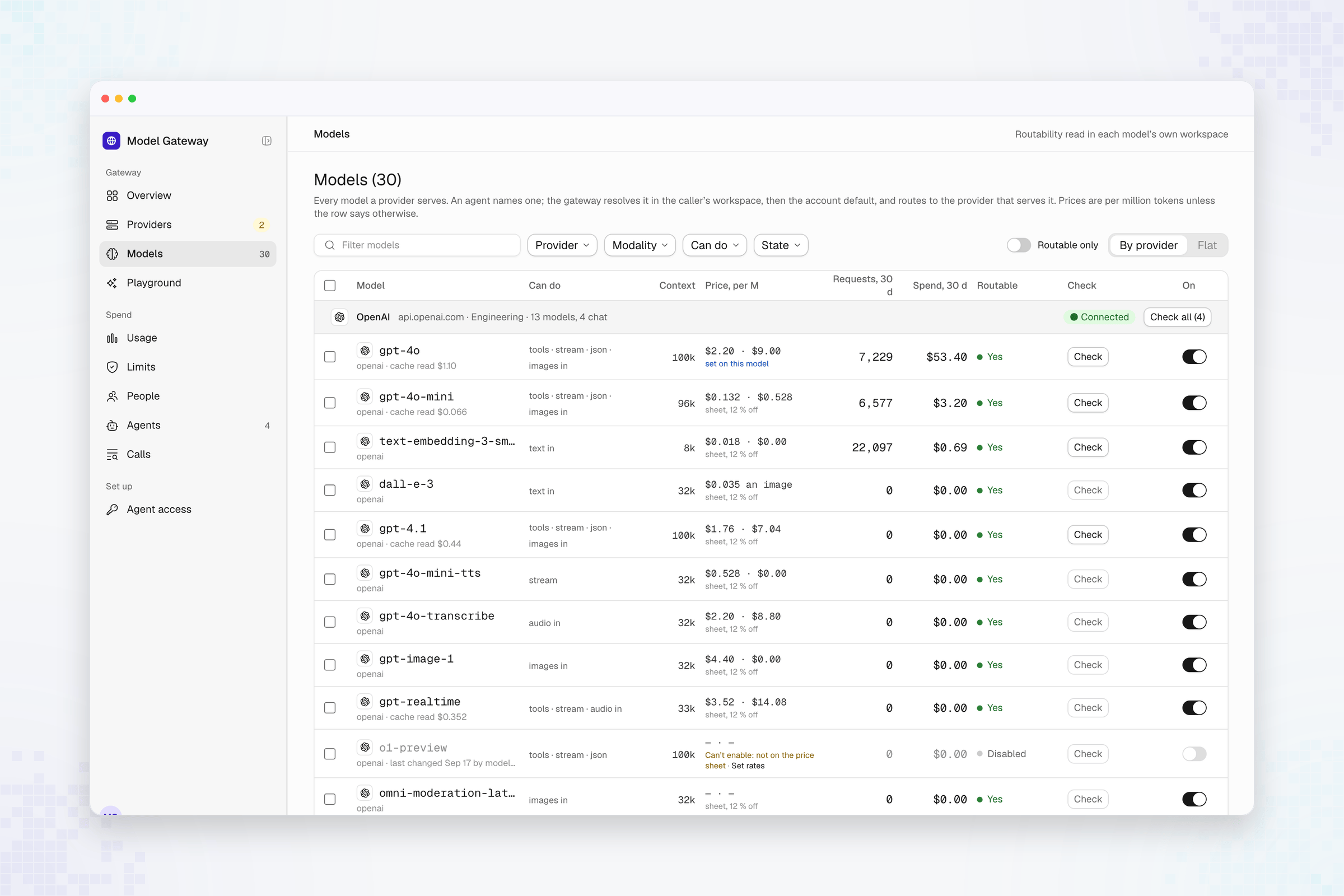 The example uses sample workspace and usage data. The **Provider**, **Modality**, **Can do**, and **State** filters narrow the catalog; **Routable only** hides entries that cannot currently serve requests.
## Models and providers
A provider is a configured connection, such as your OpenAI account or an AWS Bedrock region. A model is an entry served through that connection. Its callable name includes the provider, in the form `/`, so the same upstream model can exist behind two providers without sharing an identity.
Copy the exact `id` from `GET /openai/v1/models`. Check `modality` and `is_routable` before choosing it. Provider access and available models depend on your organization's configuration; a supported provider type does not mean it is connected to your account.
## Inspect usage
The Model Gateway studio has **Models**, **Providers**, **Agent access**, and usage reports. **Models** shows the provider, modality, enabled state, prices, and recent usage. A provider's detail view separates its models, usage, and history.
Use [FinOps](/finops/index) to understand how model activity relates to traced runs and recorded costs.
This documentation is built and hosted on [Mintlify](https://mintlify.com), a developer documentation platform.
The example uses sample workspace and usage data. The **Provider**, **Modality**, **Can do**, and **State** filters narrow the catalog; **Routable only** hides entries that cannot currently serve requests.
## Models and providers
A provider is a configured connection, such as your OpenAI account or an AWS Bedrock region. A model is an entry served through that connection. Its callable name includes the provider, in the form `/`, so the same upstream model can exist behind two providers without sharing an identity.
Copy the exact `id` from `GET /openai/v1/models`. Check `modality` and `is_routable` before choosing it. Provider access and available models depend on your organization's configuration; a supported provider type does not mean it is connected to your account.
## Inspect usage
The Model Gateway studio has **Models**, **Providers**, **Agent access**, and usage reports. **Models** shows the provider, modality, enabled state, prices, and recent usage. A provider's detail view separates its models, usage, and history.
Use [FinOps](/finops/index) to understand how model activity relates to traced runs and recorded costs.
This documentation is built and hosted on [Mintlify](https://mintlify.com), a developer documentation platform.