> ## Documentation Index
> Fetch the complete documentation index at: https://platform.atlan.com/llms.txt
> Use this file to discover all available pages before exploring further.
> ## Agent Instructions
> To act on Atlan objects, use the Atlan MCP server at https://api.atlan.com/mcp or the atlanai CLI; `atlanai --map json` prints its command map. Run a read-only identity check before any write.
> The docs MCP server at /mcp searches these docs only. It cannot read or change Atlan objects.
> SDK packages: Python `atlanai` (PyPI) and TypeScript `@atlanai/sdk` (npm). Show Python first, then TypeScript.
# MCP Gateway
> Give every agent one governed MCP endpoint for Atlan tools and the MCP servers your team already runs.
Atlan MCP Gateway gives your agents a single endpoint,
`https://api.atlan.com/mcp`. Through it they reach Atlan's platform tools and
every remote MCP server your team registers. Clients sign in once, see one
catalog, and every call is permission-checked and recorded in the account's
audit trail.

 ## Why teams use a gateway
Connecting each agent directly to each MCP server works for one developer. It
breaks down when a team runs many agents against many servers.
* **Credentials spread out.** Every client config holds its own tokens for
every server. With the gateway, server credentials stay in Atlan and never
appear in a client config file.
* **Nobody can see what ran.** Direct connections leave no shared record. The
gateway records each call: the tool, the server, the stated reason, the
outcome, and how long it took.
* **Access is all or nothing.** The gateway checks the caller's workspace
permission before it forwards a call, so being able to see a tool and being
able to run it are separate decisions.
## What you get
Connect any client that speaks Streamable HTTP to
`https://api.atlan.com/mcp`. Add servers behind it without touching client
configs.
Atlan platform tools and your servers' tools appear in one `tools/list`,
with namespaced names that never collide.
Register any remote MCP server. The gateway discovers its tools and keeps
the catalog current.
Use one shared credential for a server, or let each person connect their
own account through OAuth.
Workspace roles decide who can discover a server's tools and who can run
them.
Sessions group related calls. Each call records its tool, rationale,
outcome, and duration, but not its arguments or output.
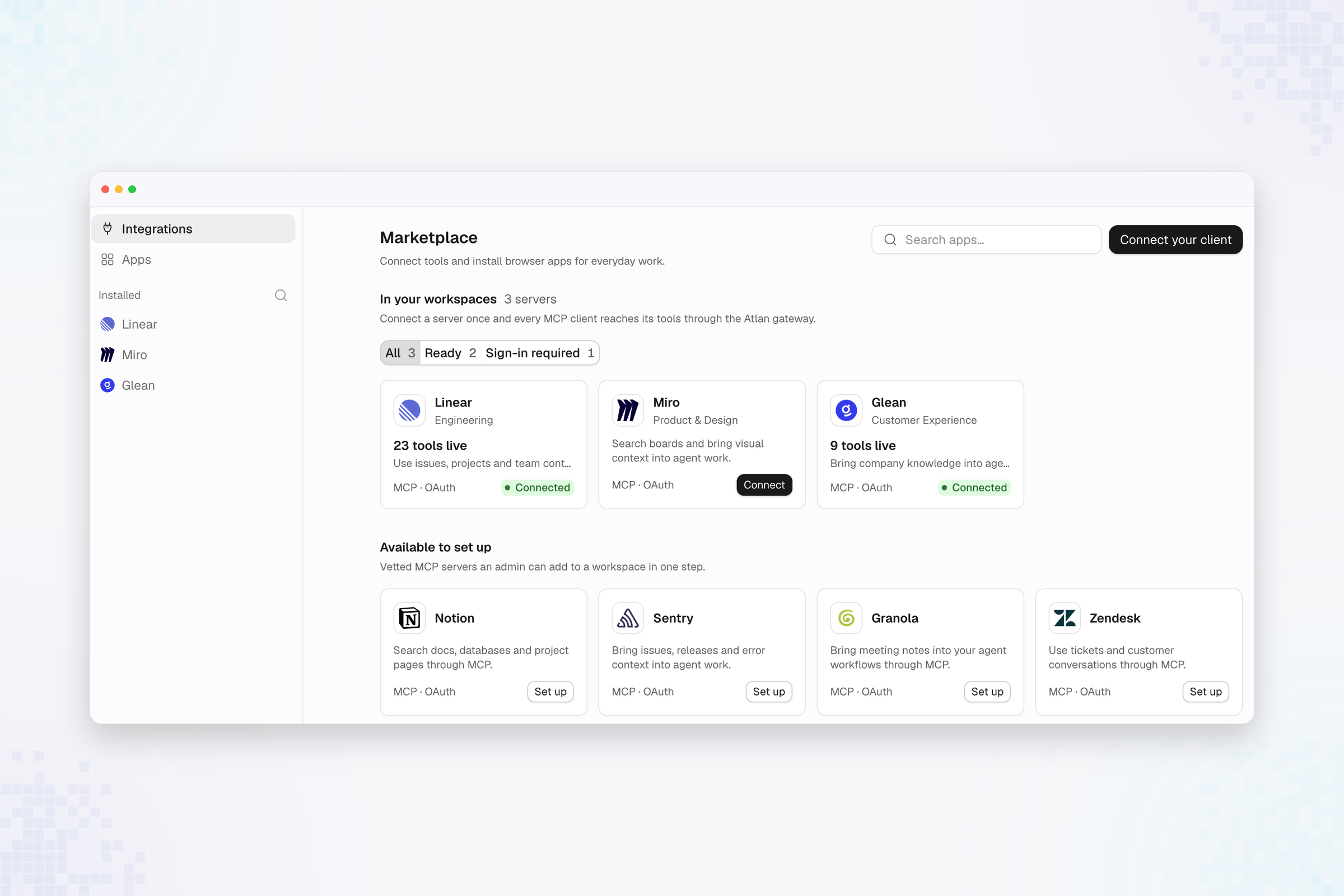
## See your servers in Atlan
The **Marketplace** shows every MCP server your workspaces use, whether each
one is connected, and the vetted servers you can add in one step.
## Why teams use a gateway
Connecting each agent directly to each MCP server works for one developer. It
breaks down when a team runs many agents against many servers.
* **Credentials spread out.** Every client config holds its own tokens for
every server. With the gateway, server credentials stay in Atlan and never
appear in a client config file.
* **Nobody can see what ran.** Direct connections leave no shared record. The
gateway records each call: the tool, the server, the stated reason, the
outcome, and how long it took.
* **Access is all or nothing.** The gateway checks the caller's workspace
permission before it forwards a call, so being able to see a tool and being
able to run it are separate decisions.
## What you get
Connect any client that speaks Streamable HTTP to
`https://api.atlan.com/mcp`. Add servers behind it without touching client
configs.
Atlan platform tools and your servers' tools appear in one `tools/list`,
with namespaced names that never collide.
Register any remote MCP server. The gateway discovers its tools and keeps
the catalog current.
Use one shared credential for a server, or let each person connect their
own account through OAuth.
Workspace roles decide who can discover a server's tools and who can run
them.
Sessions group related calls. Each call records its tool, rationale,
outcome, and duration, but not its arguments or output.
## See your servers in Atlan
The **Marketplace** shows every MCP server your workspaces use, whether each
one is connected, and the vetted servers you can add in one step.
 ## How it works
1. **Your client connects.** It points at `https://api.atlan.com/mcp` and
signs in with OAuth. The gateway accepts the current stateless MCP protocol
and the earlier `initialize` handshake on the same URL.
2. **The gateway builds one catalog.** It combines Atlan's platform tools with
the tools of every enabled server your identity can see. Each name tells
you where the tool comes from:
| Prefix | Source | Example |
| - | - | - |
| `registry__` | Atlan Registry | `registry__search_artifacts` |
| `extension____` | An Atlan platform extension | `extension__skill__create` |
| `remote____` | A server your team registered | `remote__mcp_server_01k7…__create_issue` |
3. **Your agent opens a session.** It calls `registry__initialise` once and
passes the returned `session_id` on every later call, with a short
`rationale` that says why it is making the call.
4. **The gateway governs each call.** It checks the caller's access, attaches
the server's credential, forwards the call, and records the outcome.
## Start here
Add the gateway to Claude Code, Cursor, VS Code, or any MCP client.
Add built-in integrations or any MCP server, and connect data platforms.
Semantic search returns only the tools relevant to a task.
See every call, across every server, with who made it and why.
See which MCP capabilities, transports, and credential types are supported.
This documentation is built and hosted on [Mintlify](https://mintlify.com), a developer documentation platform.
## How it works
1. **Your client connects.** It points at `https://api.atlan.com/mcp` and
signs in with OAuth. The gateway accepts the current stateless MCP protocol
and the earlier `initialize` handshake on the same URL.
2. **The gateway builds one catalog.** It combines Atlan's platform tools with
the tools of every enabled server your identity can see. Each name tells
you where the tool comes from:
| Prefix | Source | Example |
| - | - | - |
| `registry__` | Atlan Registry | `registry__search_artifacts` |
| `extension____` | An Atlan platform extension | `extension__skill__create` |
| `remote____` | A server your team registered | `remote__mcp_server_01k7…__create_issue` |
3. **Your agent opens a session.** It calls `registry__initialise` once and
passes the returned `session_id` on every later call, with a short
`rationale` that says why it is making the call.
4. **The gateway governs each call.** It checks the caller's access, attaches
the server's credential, forwards the call, and records the outcome.
## Start here
Add the gateway to Claude Code, Cursor, VS Code, or any MCP client.
Add built-in integrations or any MCP server, and connect data platforms.
Semantic search returns only the tools relevant to a task.
See every call, across every server, with who made it and why.
See which MCP capabilities, transports, and credential types are supported.
This documentation is built and hosted on [Mintlify](https://mintlify.com), a developer documentation platform.