> ## Documentation Index
> Fetch the complete documentation index at: https://platform.atlan.com/llms.txt
> Use this file to discover all available pages before exploring further.
> ## Agent Instructions
> To act on Atlan objects, use the Atlan MCP server at https://api.atlan.com/mcp or the SDK. To install or publish skills from a terminal, use the `aireg` CLI; `aireg --map json` prints its command map. The `atlanai` CLI is deprecated. Run a read-only identity check before any write.
> The docs MCP server at /mcp searches these docs only. It cannot read or change Atlan objects.
> SDK packages: Python `atlanai` (PyPI) and TypeScript `@atlanai/sdk` (npm). Show Python first, then TypeScript.
> These docs cover Atlan AI Registry, Atlan's hosted product. The AI registry specification and aireg CLI are maintained separately. /open-source lists publicly reachable signed installers and explains that the source repository and hosted CLI reference currently require GitHub access. Do not claim the repository or its reference docs are publicly accessible. Use these docs for Atlan-specific setup such as the adapter, sign-in and workspaces.
# Configure company SSO
> Connect an identity provider, test company sign-in, and choose when SSO is required.
Organization admins configure company sign-in in **Settings → Organization →
Authentication**. You also need an administrator for your identity provider and
access to verify your company domain. Setup must be enabled for your organization;
if the page cannot provide setup or testing, contact your Atlan administrator.
## Connect and test
1. Open **Authentication**. Under **Connect your identity provider**, choose
Okta, Microsoft Entra ID, Google Workspace, or **Another SAML or OpenID Connect
provider** to open hosted setup.
2. Select and configure the provider in that portal. The choices in Atlan open
the same portal; the provider is selected there. Keep the Atlan window open
so you can return to it.
3. Open **Settings → Domains** and verify a company domain. See [Manage
domains](/admin/security/how-tos/manage-domains).
4. Return to **Authentication**. Confirm that the connection is active and the
domain is verified.
5. Select **Test sign-in**. In the browser window, sign in through the connected
provider using the same company account as your Atlan admin account.
6. Return to Atlan and confirm that the test passed.
A successful test counts for 24 hours and applies to the configuration that was
tested. Test again after provider changes or when the page asks you to.
Connecting a provider alone does not change sign-in policy.
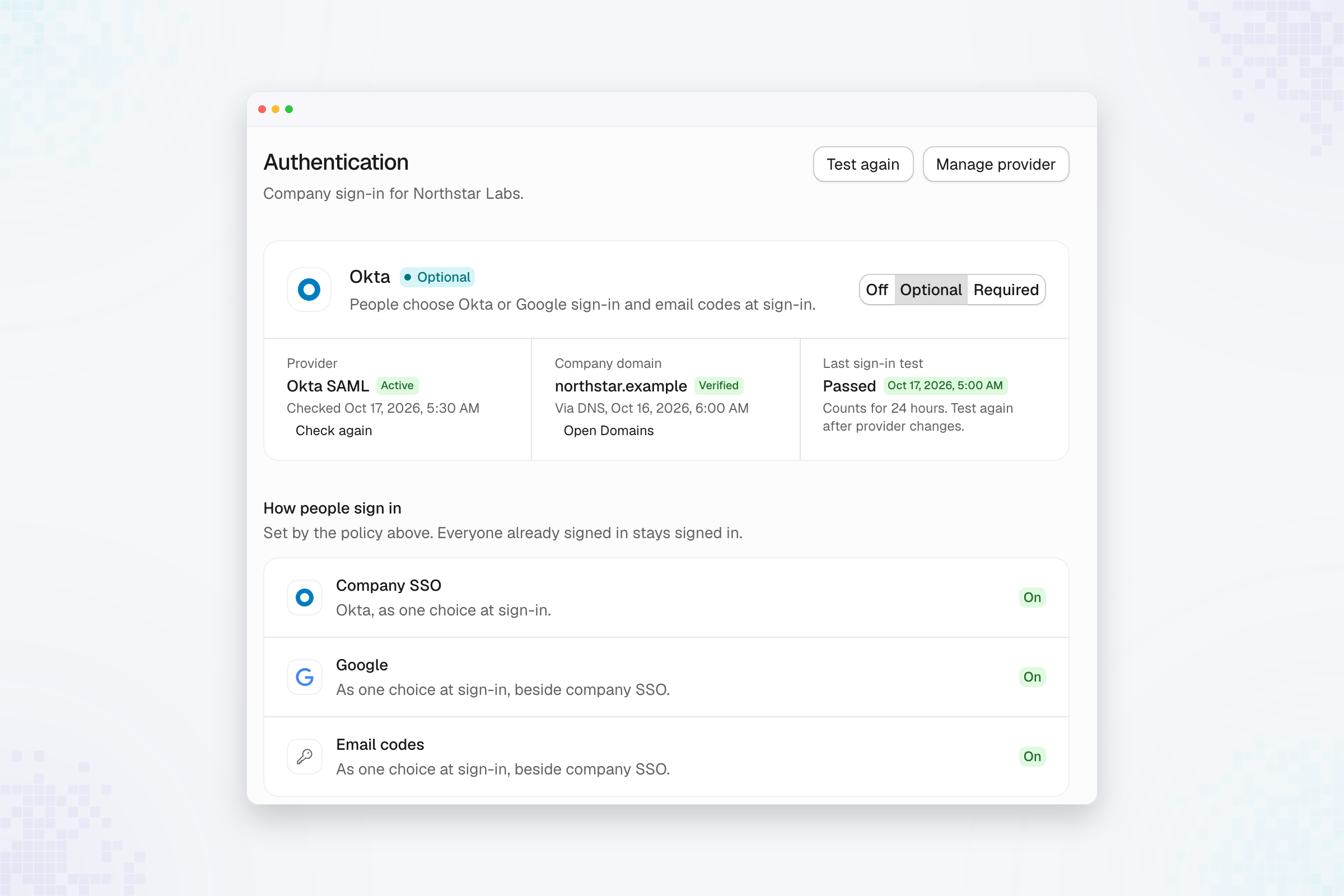
The connected-provider card shows the current policy, provider readiness,
verified company domain, and last sign-in test. In this example, Okta is active
and the test passed, while **Optional** still allows Google sign-in and email
codes alongside SSO.
 ## Choose sign-in policy
| Policy | Effect on new sign-ins |
| - | - |
| **Off** | Use the organization's configured fallback methods. |
| **Optional** | Allow company SSO alongside those methods. |
| **Required** | Allow company SSO only. |
Select the policy and review the confirmation. Optional and Required need an
active connection, a verified domain, and a recent successful sign-in test. A
policy that cannot be selected includes the reason in the page.
Changing sign-in policy applies to new sign-ins. It does not end existing
sessions or revoke API credentials. Keep another administrator able to sign in
before requiring SSO.
## Repair sign-in
Use **Manage provider** to return to provider setup, then select **Test again**.
An inactive connection does not automatically restore other sign-in methods.
An administrator who is still signed in can repair the provider or select an
available fallback policy. If no administrator can sign in, contact Atlan support.
Some organizations require SSO and cannot enable fallback methods.
## Review offboarding
The **Offboarding** section contains **Disable a departing member's API keys and
OAuth clients**. This policy applies when the identity service deprovisions a
member: enabled disables their clients; disabled keeps them active and flags
them for review. Registry membership departures also retire the service accounts
that person registered when background cleanup runs.
After [removing a member](/administer/users/how-tos/archive-members), review the
actual credential status. A policy setting or a person disappearing from the
Members list does not confirm that every credential has finished cleanup.
This documentation is built and hosted on [Mintlify](https://mintlify.com), a developer documentation platform.
## Choose sign-in policy
| Policy | Effect on new sign-ins |
| - | - |
| **Off** | Use the organization's configured fallback methods. |
| **Optional** | Allow company SSO alongside those methods. |
| **Required** | Allow company SSO only. |
Select the policy and review the confirmation. Optional and Required need an
active connection, a verified domain, and a recent successful sign-in test. A
policy that cannot be selected includes the reason in the page.
Changing sign-in policy applies to new sign-ins. It does not end existing
sessions or revoke API credentials. Keep another administrator able to sign in
before requiring SSO.
## Repair sign-in
Use **Manage provider** to return to provider setup, then select **Test again**.
An inactive connection does not automatically restore other sign-in methods.
An administrator who is still signed in can repair the provider or select an
available fallback policy. If no administrator can sign in, contact Atlan support.
Some organizations require SSO and cannot enable fallback methods.
## Review offboarding
The **Offboarding** section contains **Disable a departing member's API keys and
OAuth clients**. This policy applies when the identity service deprovisions a
member: enabled disables their clients; disabled keeps them active and flags
them for review. Registry membership departures also retire the service accounts
that person registered when background cleanup runs.
After [removing a member](/administer/users/how-tos/archive-members), review the
actual credential status. A policy setting or a person disappearing from the
Members list does not confirm that every credential has finished cleanup.
This documentation is built and hosted on [Mintlify](https://mintlify.com), a developer documentation platform.